


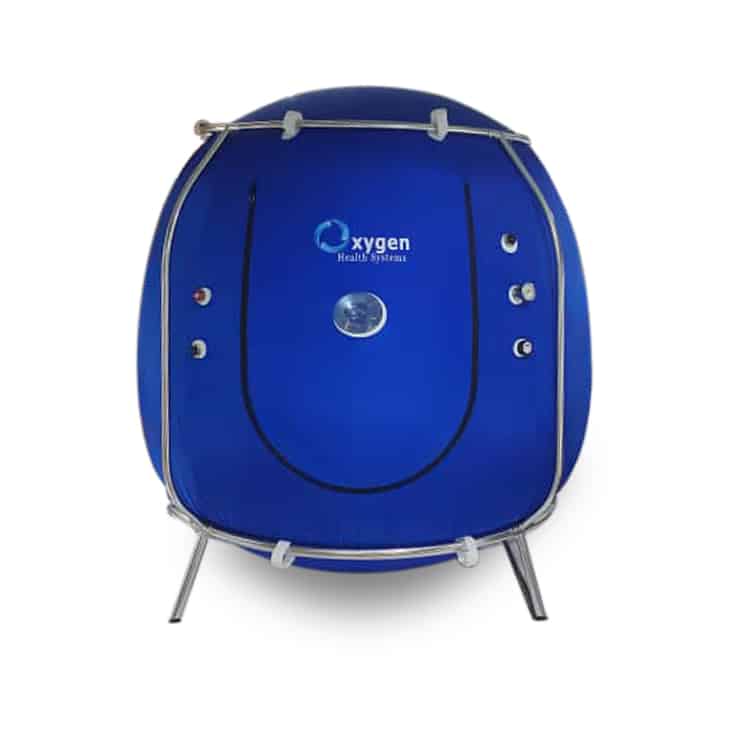

Buying a hyperbaric chamber for a clinic or spa involves decisions that affect every appointment. You need to understand how the chamber operates, how staff will use its controls, and what happens when a session needs to change. A polished exterior and a long feature list give you only part of that information.
<< View Current Price >>
For a high-pressure chamber, four features deserve a closer
look: one-touch pressure selection, quiet automatic depressurization,
accessible emergency controls, and automated session programs. These features
can influence daily workflow, but their value depends on what the specific
model actually does and how well your team understands it.
This guide explains how to evaluate those features, which
questions to ask manufacturers, and how to use medical references responsibly.
It also includes answers to common questions about pressure selection,
depressurization, emergency releases, and Efrati-style programs.
Start with your intended use and the clinical requirements
of your service. Then compare chambers through documentation and
demonstrations. That approach gives you a clearer basis for choosing equipment
that fits your facility.
Understand the treatment before comparing chamber features
Hyperbaric oxygen therapy, commonly called HBOT, involves
breathing oxygen in a chamber with pressure above normal atmospheric pressure.
The treatment environment allows greater oxygen delivery than breathing oxygen
at ordinary pressure. Mayo Clinic describes its use for conditions such as
decompression sickness, carbon monoxide poisoning, certain nonhealing wounds,
and radiation-related tissue damage. [1]
When comparing equipment, separate the chamber's operating
capabilities from the treatment plan. A pressure setting tells you what the
machine can deliver. It does not establish whether that setting is appropriate
for a particular person or condition.
Also clarify the complete oxygen-delivery arrangement. Ask
what equipment is included, how oxygen reaches the occupant, and which
accessories are required for the intended use. A chamber brochure may focus on
the shell and control panel while leaving those practical details unclear.
Use the same written questions for every manufacturer. This
makes differences easier to identify and helps prevent a compelling
presentation from becoming your only basis for comparison.
General medical references explain treatment principles. The
model's operating manual should establish its actual functions and limitations.
Keep both types of information available as you evaluate the purchase.
Feature one is clear and flexible pressure selection
One-touch pressure selection lets an operator choose a
preset pressure through a button or touchscreen control. Its practical appeal
is straightforward: staff can select an available setting without repeatedly
adjusting several controls. However, the phrase alone does not tell you how the
chamber manages the change.
Ask the manufacturer to identify every available preset and
demonstrate the selection process. The display should make the chosen setting
easy to recognize. Also ask how staff can confirm the actual chamber pressure
during operation and whether the interface distinguishes that reading from the
target setting.
This distinction matters when comparing products. A screen
that shows the requested pressure may look reassuring, but operators still need
a clear understanding of what the chamber is doing. Have the manufacturer
explain the information displayed during startup, the session, and
depressurization.
Johns Hopkins Medicine notes that oxygen dosing is
individualized and that chamber pressure is increased gradually during
treatment. This supports considering the person's clinical needs when planning
a session. It does not establish that every person should eventually reach the
chamber's maximum pressure. [2]
If a clinician recommends a lower pressure or a gradual
increase across appointments, your team should understand how the equipment
supports that plan. Ask whether settings can be selected before a session, what
changes are permitted during operation, and how those changes are documented.
Consider a typical appointment in which the prescribed
setting differs from the previous patient's setting. Can the operator clearly
review and confirm the new selection? Does the chamber retain earlier settings?
What must staff do before starting? These questions help you evaluate everyday
usability without assuming how a particular model behaves.
Request a demonstration that follows the operating manual.
Watch how the representative explains each action. A feature becomes more
useful when your staff can understand it, repeat the process, and recognize
when they need assistance.
Finally, ask which pressure controls are included in the
quoted price. Presets, software options, and additional interfaces may vary
between models. Get the configuration in writing so the chamber you receive
matches the system you evaluated.
Feature two is quiet and controlled automatic depressurization
Depressurization returns the chamber toward normal
atmospheric pressure at the end of a session. An automatic system can manage
that process according to its programmed settings. For a clinic or spa with
several appointments each day, the sound and operation of that system deserve
attention.
Quiet operation may help preserve the atmosphere you want in
the treatment room. It can also matter when another service is taking place
nearby. Instead of accepting the word silent as a complete description, ask to
hear the chamber through an entire operating cycle.
Pay attention to where the sound occurs. Noise near the
occupant, at an exhaust outlet, or in an adjoining room may affect the facility
differently. Ask where associated equipment must be installed and whether the
demonstrated arrangement matches your planned room layout.
If the manufacturer provides a noise measurement, request
the measurement conditions. Distance from the equipment, room characteristics,
and the operating stage can affect how useful that number is for comparison. A
recording may provide an introduction, but an appropriate live demonstration
offers better context.
Next, clarify what automatic means. Does depressurization
begin according to a session timer? Does the operator initiate it? Can staff
see its progress? Ask how the programmed duration relates to the total
appointment time, including preparation and the return to normal pressure.
Automation can reduce the number of routine manual
adjustments, but your appointment schedule should still allow for the actual
process. Avoid building turnover estimates around an unexplained timer value.
Ask the supplier to walk through an example from patient preparation to
readiness for the next appointment.
Mayo Clinic discusses pressure-related ear discomfort and
monitoring during HBOT. Those considerations make pressure management relevant
to the patient experience, although its article does not assess quiet automatic
systems. [1]
Evaluate the feature through manufacturer documentation and
observation. The useful question is whether its controls and sound levels fit
your service, room, and staffing arrangements.
Feature three is accessible and understandable emergency controls
Emergency controls should receive a detailed explanation
before purchase. If a chamber advertises interior and exterior emergency releases,
ask the manufacturer to show where they are located and explain exactly what
each control does.
The term emergency release can describe different functions.
A control might initiate a pressure-release procedure, stop a process, or form
part of a door-opening arrangement. Those actions should be defined in the
operating manual. Avoid assuming that a label explains the complete sequence.
Ask how the occupant communicates a concern and how the
operator responds. Review whether controls can be reached from the intended
seating or reclining position. If the chamber will serve different occupants,
consider how the supplier explains access and operation during orientation.
Door opening must follow the manufacturer's required
pressure-release and opening procedures. Ask how staff confirm that the
conditions for opening have been met and what they should do if a control does
not respond as expected. Request documented instructions rather than relying on
a brief verbal explanation.
The FDA's August 2025 safety communication emphasizes
manufacturer instructions, staff training, patient monitoring, maintenance, and
safety checks. It also highlights fire prevention because high oxygen
concentrations create additional fire concerns. The communication provides
general operating guidance rather than recommending a particular door-release
design. [3]
When evaluating the supplier, ask who provides training and
what materials staff receive afterward. A demonstration during the sales
process should be followed by training appropriate to the installed system.
Make sure your team knows how to find the relevant instructions when questions
arise.
Also review what happens if power or another supporting
system is interrupted. Ask the manufacturer to explain the model's documented
response and the operator's responsibilities. These questions help you assess
whether the instructions are clear and whether support is available when
needed.
Accessible controls are most valuable when their functions
are understood. Consider the physical arrangement, the instructions, and the
training together as you compare chamber options.
Feature four is automation with clearly defined protocols
Automated programs can organize several session functions
within a predefined sequence. Depending on the model, those functions may
include pressure settings, timing, or other supported controls. Ask the
manufacturer to describe each program in plain language and identify which
actions still require staff involvement.
A preset name is not enough to evaluate a program. Request
its documented settings, the steps it performs, and any limitations. Ask
whether the program can be reviewed before use and how the operator confirms
that the selected sequence matches the intended session.
For example, one chamber may automate pressure and timing
while another provides reminders for separate actions. Both could be advertised
as offering automated protocols. A comparison becomes useful when you know
whether a function is physically controlled by the system or simply displayed
as a prompt.
The same care applies to an Efrati-style program. Research
involving Dr. Shai Efrati has used specific treatment schedules that include
oxygen exposure and planned air breaks. In a 2020 randomized trial involving
healthy older adults, participants received oxygen at a defined pressure with
scheduled periods of breathing air. The study was conducted in Israel and is
indexed in PubMed, a U.S. National Library of Medicine resource. [4]
That research should not be treated as validation of an
unspecified commercial preset. If a supplier refers to an Efrati protocol, ask
which publication it means and how its program compares with the study's
equipment, oxygen delivery, timing, and treatment schedule.
In particular, ask what happens during an advertised air
break. Does the system change the breathing gas, notify the operator, or
require the occupant to follow separate instructions? Pressure changes and
changes in breathing gas are different functions. The manufacturer should
explain which function its program actually performs.
Also ask who reviews the program for the intended patient
and use. Automation can carry out supported equipment functions, but the
presence of a preset does not establish that its use is appropriate for
everyone or that it will reproduce a study's results.
Get written confirmation of included programs, software
access, and any associated charges. If the interface or program library changes
through updates, ask how those changes are communicated and how staff receive
revised instructions.
Review the workflow your staff will use every day
The four features become easier to assess when you place
them within a complete appointment. Ask the manufacturer to demonstrate the
steps your operator would take before, during, and after a session. Use the
same example with each supplier so you can compare the experience fairly.
Start with preparation. What information does the operator
review? Where are the selected settings displayed? How does the system indicate
that it is ready? Then follow the session through completion and the steps
required before another occupant enters.
Look closely at the interface. Text should be understandable
to the people operating the equipment, and frequently used controls should be
easy to identify. Ask how the manufacturer explains alerts and where staff can
find guidance about their meaning.
Consider whether the demonstration leaves your team with
unanswered questions. If several functions require additional equipment or
accessories, ask the supplier to include them in the explanation. A
demonstration of only the screen may leave important parts of the workflow
unexamined.
Discuss recordkeeping as well. Ask whether the chamber
provides session records, which information those records contain, and how
staff can access them. If a feature is optional, confirm its cost and whether
it requires separate software or an ongoing subscription.
Think about staff changes over the life of the chamber. Ask
how new operators can be trained and whether refresher materials are available.
Clear instructions can make onboarding easier and help your facility avoid
relying on one person's recollection of the original demonstration.
Keep notes during the comparison. Describe what you observed
and which claims still need documentation. This gives your purchasing team a
useful record when reviewing proposals later.
Plan the room around the complete system
Before choosing a model, request dimensions for the
installed arrangement. Include supporting equipment, access around the chamber,
and the space needed for the door to operate. Ask the supplier to review your
proposed layout and identify any requirements in writing.
Think through an appointment from the moment a person
arrives. Where will staff explain the session? Where can the operator view the
controls? How will the occupant communicate with staff? These questions help
connect the purchase to your intended experience.
The room also gives quiet-operation claims their practical context.
An exhaust outlet beside another treatment area could matter more to your
business than the sound during a showroom demonstration. Ask the representative
to explain how equipment placement may affect your planned arrangement.
Consider the people who will use the chamber. Ask how they
enter and exit, where they sit or recline, and how the supplier explains access
to communication and emergency controls. Review the configuration being quoted,
since interior arrangements can differ between models or options.
Include your operators in this discussion. They can identify
questions about screen visibility, access to frequently used controls, and the
steps involved in preparing the room between appointments. Their observations
can help you evaluate whether the proposed layout is practical.
Request an installation plan before scheduling delivery.
Check that the supplier has addressed your actual room rather than describing a
generic setup. Resolving layout questions early can help you compare proposals
accurately and understand which additional arrangements your facility must
make. Keep the agreed layout with the quotation so everyone reviewing the
purchase can see how the system is expected to fit and operate within the
available space.
Compare support and the complete equipment proposal
Request a written proposal that identifies the chamber model
and the exact configuration being offered. Include the features discussed
during the demonstration, supporting equipment, installation requirements, and
the training provided. This helps you distinguish the standard package from
optional additions.
Ask who will install the equipment and explain its operation
after delivery. Clarify which responsibilities belong to your facility and
which belong to the supplier. If another contractor is involved, request a
clear description of the work before committing to a purchase.
Review the support arrangements with the same care. Who
answers operating questions? When is support available? How are service
requests handled? Ask about replacement parts, planned maintenance, and the
documentation supplied for the quoted model.
A feature that looks convenient during a demonstration may
require an accessory, software license, or service arrangement. Check those
details in the proposal. Comparing complete configurations gives you a more
useful picture than comparing starting prices alone.
Before making your decision, return to the needs of your
facility. Choose the system whose documented capabilities, operating process,
and support arrangements fit the service you intend to provide.
Use health references without overstating product claims
Medical articles can help readers understand HBOT, its
established uses, and its risks. They should be connected to the claims they
actually discuss. A hospital article about pressure-related discomfort does not
demonstrate that a particular chamber is quieter or easier to operate.
Harvard Health's overview distinguishes evidence-based uses
from claims that lack sufficient support. It is useful background for readers
evaluating treatment information, but it does not endorse the operating
features of a commercial chamber. [5]
Use manufacturer materials to substantiate model-specific
claims. For noise, request relevant measurements or a demonstration. For
automation and emergency controls, request the operating instructions. For
references to clinical research, identify the publication and describe the
comparison accurately.
This approach makes your purchasing discussion and your
public-facing content more useful. Readers can understand both the practical
feature being discussed and the limits of the evidence supporting it.
Frequently asked questions
Why
is one-touch pressure selection important in a high-pressure hyperbaricchamber?
One-touch selection allows the operator to choose an
available preset with the press of a button. It can simplify operation when a
clinician recommends a lower setting or a gradual increase across sessions.
Confirm the available presets and how the system displays actual pressure.
Johns Hopkins Medicine provides background on individualized oxygen dosing and
gradual pressure changes, although it does not specifically recommend one-touch
controls. [2]
What
are the benefits of quiet automatic depressurization?
A quiet system may help maintain a calm treatment
environment, while automatic controls can reduce routine manual adjustments
during pressure release. Ask about actual sound levels, programmed timing, and
operator controls. Mayo Clinic provides context on pressure-related discomfort
and treatment monitoring; its guidance does not evaluate quiet automatic
systems. Verify those product features with the manufacturer. [1]
Should
a hyperbaric chamber have emergency release controls inside and outside?
When comparing chambers, check whether emergency controls
are accessible to both the occupant and the operator. Ask what each control
does and how the manufacturer requires staff to manage depressurization and
door opening. The FDA emphasizes following manufacturer instructions, training
staff, and monitoring patients. Its guidance does not establish a particular
interior and exterior release design as a universal requirement. [3]
What
should I check when a chamber offers automated protocols or an Efrati-style
program?
Confirm which functions are automated, including pressure,
timing, oxygen delivery, and any air-break arrangements. If an Efrati-style
program is advertised, request the specific research reference and a documented
comparison. A commercial simulation should not be assumed to reproduce the
research protocol or its outcomes. Published research involving Efrati
describes defined treatment conditions; it does not validate every automated
chamber program. [4]
Make the purchase based on documented capabilities
Compare the four features through an appropriate
demonstration, the operating manual, and a complete written proposal. Ask the
supplier to explain settings, automatic functions, emergency procedures, and
the support your staff will receive. Keep clinical decisions with the
professionals responsible for care. A clear record of what the equipment does
will help you choose a chamber that fits your facility and explain that choice
accurately.
References and further reading
[1] Mayo Clinic — Hyperbaric Oxygen Therapy
[2] Johns Hopkins Medicine — Complications of Hyperbaric
Oxygen Treatment
[3] FDA — Follow Instructions for Safe Use of Hyperbaric
Oxygen Therapy Devices



0 Comments